Mia World - Makeover Life
- 3.5
- Rating
- 10.00M
- Installs
- Free
- Price

 Analysis by App-foxy
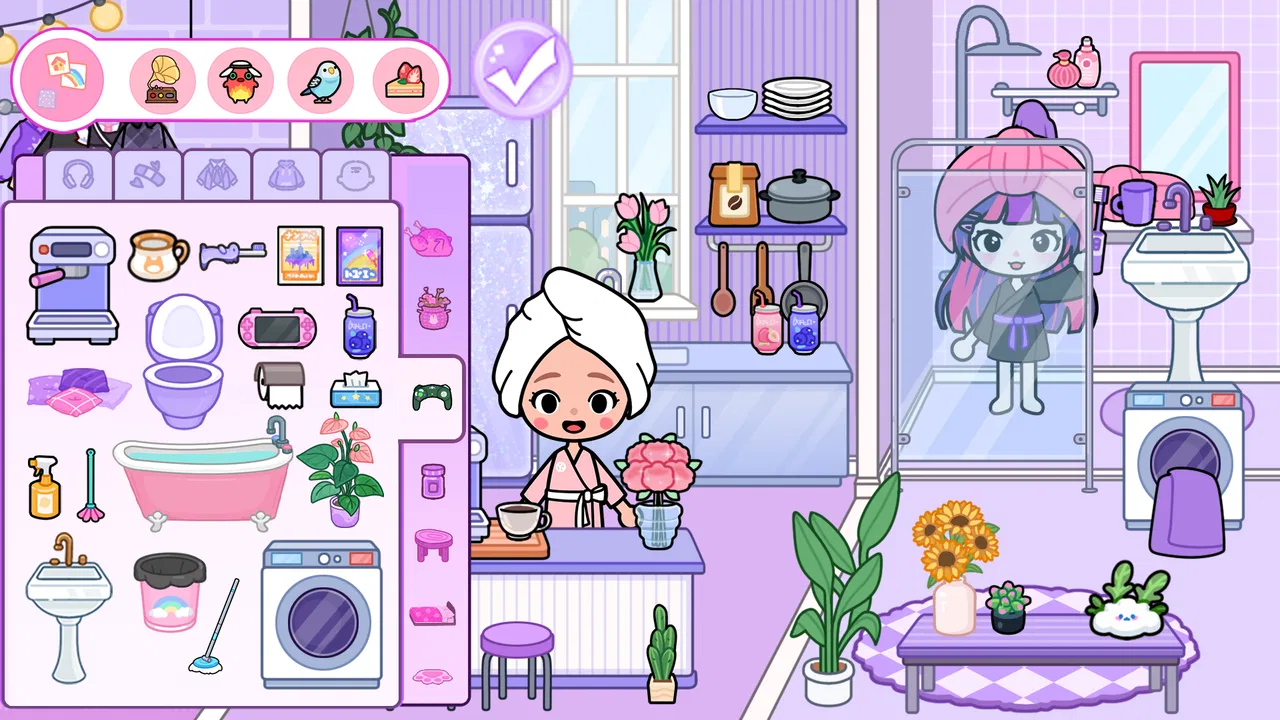
Some avatar games are little more than a closet with a few poses, while others try to become a complete miniature world. Mia World - Makeover Life sits in the second group. I found it easiest to understand as an educational, child-friendly dress-up game where creating a character is only the starting point. The appeal comes from arranging a personal space, changing Mia’s look, and exploring the small world that grows around those choices.
That makes the game a natural fit for children who enjoy pretend play, visual design, and making up stories without needing complicated rules. It is free to start, rated Everyone, and available for devices running Android 6.0 or later. The developer is 31 Dress up Games, and the current version is 1.4.6. I would not approach it as a competitive game or a lesson-based app with formal progress. Its educational value is gentler: it encourages choices, sequencing, imagination, and attention to visual details.
What to expect when Mia World opens
The first thing I would tell a new player is not to rush toward a single “correct” outfit or room. The experience is built around experimenting. You can treat Mia as a character to style, a resident of a dreamhouse, or the center of a simple story you invent yourself. That flexibility is the strongest part of the game, especially for younger players who may not care about objectives in the usual sense.
You May Also Like

 Blood Strike: 2.5 Anniversary
Blood Strike’s Loadouts Turn Every Drop Into a Tactical Gamble
A close look at Blood Strike’s custom loadouts: how fast access to signature weapons reshapes its battle royale rhythm, rewards preparation, and narrows the gap between fights.

 Pandora - Music & Podcasts
Pandora’s Music Is Easy to Start, but Harder to Recover
Pandora’s strength is its low-effort path from a seed to a station. Its weak spot is how much confidence it asks you to place in connection, setup, and quiet recovery.

 8 Ball Pool
 Is Built on Rivalries, Rematches, and Routine
A close look at the rivalries, rematches, shared routines, and unanswered safety questions that turn a quick pool match into a persistent mobile community.

 Samsung Music
’s Quiet Strength Is Playing What You Already Own
Its reach comes less from spectacle than from dependable access to a personal library. That simplicity is both the app’s strongest retention engine and its ceiling.

 AccuWeather: Weather Radar
AccuWeather Review: A Quick, Clear Forecast for Everyday Decisions
For everyday plans, the best forecast is the one you can understand quickly. AccuWeather makes rain timing, radar, and local conditions easy to act on, with a few trade-offs.

 Hill Climb Racing
Why Hill Climb Racing Still Turns Crashes Into One More Run
A tiny car, a bumpy hill and one more upgrade: Hill Climb Racing keeps resurfacing because its simple chaos makes every near-miss feel personal.
More From Our News Desk



The store summary describes a world focused on creating, designing, and exploring, and that description matches the general shape of the experience. Instead of asking you to memorize rules or defeat opponents, it invites you to make visual decisions. A child might begin with clothing, move to the home, and then decide what kind of day Mia is having. That open-ended rhythm is relaxing, although players who need missions, levels, or a clear finish line may find it loose.
I also think the game works best when an adult frames it as a creative activity rather than a traditional game. A parent can ask why a certain outfit fits a room, what Mia might do next, or how the space could be changed for another occasion. Those questions turn simple tapping into storytelling and planning. Without that extra conversation, the app can still be enjoyable, but its educational side remains mostly informal.
Its audience is broad enough to explain its popularity: the game has passed ten million installs and holds an average rating of 3.7 from roughly twenty-nine thousand ratings. That does not make it perfect, but it suggests that many families recognize the basic appeal. I would read the rating as a reminder to keep expectations realistic. This is a casual creative playground, not a polished life simulator with deep systems.
How I would approach the first few minutes
After installing, I would give the player a quiet moment to look around before trying to change everything. The most useful first goal is simply to identify the main areas: where Mia can be styled, where the home can be arranged, and how to return to the wider world. New players often tap every visible object immediately and then lose track of where they started. A slow first look makes the rest feel much less confusing.
I would also recommend deciding on one small theme. “A comfortable bedroom,” “a party outfit,” or “a rainy-day look” is enough. A theme gives each choice a purpose and prevents the first session from becoming an endless sequence of random changes. This is one of the easiest ways to turn a loose dress-up activity into a satisfying mini-project.
For a child using the game independently, the first session should stay focused on discovery rather than unlocking everything. The pleasure comes from noticing what can be changed and seeing how separate choices combine. If an adult is nearby, it helps to let the child lead. Giving direct instructions such as “choose this outfit” removes the decision-making that makes the game worthwhile.
Making the first meaningful creation
My preferred first success is a complete scene rather than a single costume. Start by giving Mia a look that suggests a role, then adjust the surrounding home so it supports that idea. For example, a dressed-up character becomes more convincing when the room feels prepared for the same occasion. The result does not need to be elaborate; the important step is learning that the avatar and environment can be considered together.
This is also where the game can quietly build useful habits. A child has to compare options, remember a chosen theme, and decide when a scene feels finished. Those are small acts of planning. The game does not turn them into worksheets or tests, which is precisely why they can feel natural. I would call this creative learning through repeated visual decisions, rather than formal education.
A practical tip is to change one category at a time. Choose the character’s general style first, then clothing, then the room. If everything changes simultaneously, it becomes difficult to understand which choice improved the scene. Working in stages makes the process easier for a first-time player and gives the child a clear sense of progress even when there is no conventional level system.
Another useful approach is to create two contrasting versions of the same idea. A quiet home and a lively home can use the same character while producing completely different moods. Comparing them encourages observation and gives older children a reason to revisit their earlier choices. This is a more rewarding use of the app than simply tapping through every available item once.
Where new players may feel lost
The open design is friendly, but it can also create uncertainty. Players accustomed to puzzle games may look for a task marker, reward screen, or instruction telling them what to do next. Mia World does not need to be played that way. When the screen seems to offer no obvious objective, the answer is usually to choose a personal goal: style a character, prepare a room, or build a small story around the scene.
Another common confusion is assuming that every visible part of the world must be used immediately. I found it more comfortable to think of the spaces as a collection of prompts. Explore one area, make a change, and return later with a new idea. Trying to inspect everything in one sitting can make the experience feel repetitive, particularly for adults who are evaluating it quickly.
It is also worth explaining to children that a design is not “wrong” because another outfit or room looks different. The game is strongest when it supports personal taste. If a child keeps changing choices because they are searching for a hidden best answer, I would shift the conversation toward mood and purpose: Which version feels cozy? Which one looks ready for visitors? That turns uncertainty into a creative decision.
Because the title is free, families should also pay attention to the purchase context. Optional in-app items range from $0.99 to $4.99 each. I would set expectations before handing the device to a child and make it clear that the free starting experience is not a promise that every possible item is included. The purchase range is modest compared with some mobile games, but repeated small purchases can still add up.
What makes the experience useful beyond dress-up
The most interesting strength is the relationship between appearance and setting. Many dress-up games stop at choosing clothes, so the player has little reason to think about context. Here, the home-world idea gives those choices somewhere to live. A child can explore how a character’s identity is communicated through both personal style and surroundings. That is a simple concept, but it gives the activity more depth than changing outfits in isolation.
I also like the way the game can support short sessions. A player does not need a long uninterrupted block of time to make one meaningful change. A few minutes before dinner can be enough to finish a room idea or try a new character style. This makes it easier to use as a calm creative break rather than an app that demands constant attention.
For younger children, the game can become a vocabulary prompt. An adult might ask them to describe colors, textures, locations, or the reason behind an outfit. For children practicing communication, explaining a scene can be more valuable than simply assembling it. The app does not have to provide a formal teaching mode for a parent to use it in that way.
There is a useful trade-off here. The lack of pressure makes the game approachable, but it also means motivation depends on the player’s imagination. A child who loves inventing stories may return often, while someone who wants explicit rewards may lose interest quickly. I would choose this over a more goal-heavy alternative for relaxed creative play, but not for a child asking specifically for challenges and measurable progression.
A realistic everyday use case
Imagine a child has ten minutes after school while a parent prepares dinner. Instead of opening a competitive game, the child can choose one small task: prepare Mia’s room for a pretend celebration. They select a suitable look, adjust the home to match, and then explain what is happening in the scene. The session has a beginning, a decision-making middle, and a natural stopping point when the room feels complete.
That stopping point matters. Open-ended games can encourage endless browsing, but a theme gives the player permission to finish. I would encourage saving the idea mentally or showing it to a parent before starting another one. The goal is not to produce a perfect design; it is to practice completing a creative thought.
The same approach works during shared play. One person can choose Mia’s outfit while another decides how the home should feel, then they can compare the result with their original plan. This creates a small collaborative activity without turning the game into a contest. It is especially suitable for siblings or an adult and child who enjoy talking through choices.
How it compares with familiar alternatives
Compared with a standard dress-up app, Mia World offers a broader setting because the character is connected to a home and an explorable world. That gives the player more room for role-play and makes the result feel like a scene rather than a mannequin display. If your main interest is fashion combinations alone, a focused wardrobe app may be faster and more satisfying.
Compared with a structured educational game, this one is much less instructional. There are no formal lessons to follow in the way a spelling, mathematics, or logic app might present them. Its educational category is better understood through creative practice: choosing, arranging, imagining, and describing. Families looking for direct academic reinforcement should use a dedicated learning app instead.
Compared with a life-simulation game, the experience is lighter and easier to enter. You are not required to manage a complicated schedule or understand a large economy before enjoying the first scene. That simplicity is helpful for younger players, but players seeking detailed relationships, resource management, or long-term progression may find it shallow.
The game’s audience scale and Everyone rating make it an approachable recommendation for families, but those labels should not be mistaken for a guarantee that every child will enjoy it. Taste matters more here than age alone. A child who likes visual customization is likely to understand the appeal quickly; a child who asks, “What am I supposed to win?” may need guidance or may simply prefer another genre.
Small habits that improve the experience
I would begin each session with a single creative brief. Keep it short, such as “make Mia ready for a quiet evening.” This prevents the interface from becoming a distraction and gives the player a reason to evaluate choices instead of selecting items at random.
Next, make changes in a fixed order: character, outfit, room, then exploration. That sequence is not a rule imposed by the game; it is a practical workflow I found easier to follow. It reduces backtracking and helps a child see how each decision affects the final scene.
For families concerned about purchases, I would establish a simple rule before play: use the free options first, and discuss any paid item before selecting it. Since individual purchases can cost between $0.99 and $4.99, this conversation is more useful than assuming the child will understand the difference between a decorative choice and a transaction.
Finally, do not judge the game by how quickly it produces a finished result. Its value appears when the player revisits an idea, changes the mood, or explains why a scene works. If you only have time to tap through the available choices, it may feel thin. If you allow room for pretend play, it becomes more expressive.
Who should install it, and who should skip it
I would recommend Mia World to children who enjoy avatars, home decoration, and open-ended storytelling, as well as parents looking for a gentle creative activity. It is also a good choice for a first-time user because the basic idea is easy to grasp: make Mia look the way you want and shape the world around her.
I would be more cautious for players who need clear missions, competitive goals, deep simulation, or a strong sense of progression. The game’s relaxed structure may feel aimless to them. I would also skip it as a primary educational tool if the goal is direct practice in reading, arithmetic, science, or another school subject.
The free entry point makes trying it straightforward, while the age rating keeps it suitable for a broad audience. Still, I would involve an adult when a child is using a device with purchasing enabled. That is not a criticism of the creative design; it is simply the sensible way to manage optional items in any free mobile game.
My final take after settling into its rhythm
Mia World - Makeover Life works best when I stop looking for a conventional game loop and treat it as a small digital playroom. The first meaningful success is not reaching a stage or collecting a prize. It is creating a character-and-home combination that feels intentional, then being able to explain the idea behind it.
The developer, 31 Dress up Games, has aimed this release at accessible visual play rather than demanding strategy. That choice makes it welcoming, but it also limits the experience for anyone wanting complexity. The 3.7 average rating feels understandable: the concept is appealing and easy to enter, yet the open-ended format will not satisfy every player for long.
My recommendation is to install it with a clear expectation. Give a child a theme, let them make the decisions, and use the finished scene as a prompt for conversation. If that sounds enjoyable, the app has enough room for repeated creative sessions. If you want lessons, competition, or a detailed simulation, another category will serve you better.
For a free educational game centered on avatars, design, and pretend play, I think it earns a fair trial. Its real strength is not the number of things to tap, but the way it turns styling and decorating into a simple story-making routine. Start small, finish one scene, and let the next idea grow from there.
FAQs for Mia World - Makeover Life
01What is Mia World - Makeover Life about?
Mia World - Makeover Life is an engaging simulation game where players can dive into the fashion industry. You get to style characters, manage fashion events, and create stunning makeovers. The game offers a blend of creativity and strategy, making it a favorite among fashion enthusiasts and casual gamers alike.
02Is Mia World - Makeover Life free to play?
Yes, Mia World - Makeover Life is free to download and play. However, it does offer in-app purchases that can enhance your gaming experience. These purchases are optional and include items like special outfits, accessories, and event passes. Always check your app store for the latest pricing details.
03What are the system requirements for Mia World - Makeover Life?
To run Mia World - Makeover Life smoothly, ensure your device meets the following requirements: For Android, a minimum of Android 5.0 is necessary. For iOS users, iOS 11.0 or later is required. It’s recommended to have at least 1GB of free storage for optimal performance.
04How can I contact customer support for Mia World - Makeover Life?
You can contact customer support directly through the app by navigating to the settings menu and selecting 'Help & Support.' They also offer an email support option, which is detailed on their website. Response times may vary, but they aim to address inquiries within 48 hours.
05Can I play Mia World - Makeover Life offline?
Mia World - Makeover Life requires an internet connection to access all features, including events and social interactions. However, some basic gameplay elements like offline styling may still be accessible without a connection. It's recommended to stay online to enjoy the full experience.
Pros
- User-friendly interface for easy navigation.
- Wide range of customization options.
- Regular updates with new content.
- Engaging storyline keeps players hooked.
- Minimal in-app ads for uninterrupted play.
Cons
- Requires internet connection to play.
- Some features locked behind paywall.
- High battery usage during gameplay.
- Occasional lag on older devices.
- Limited support for offline play.

Mia World - Makeover Life
Gallery